
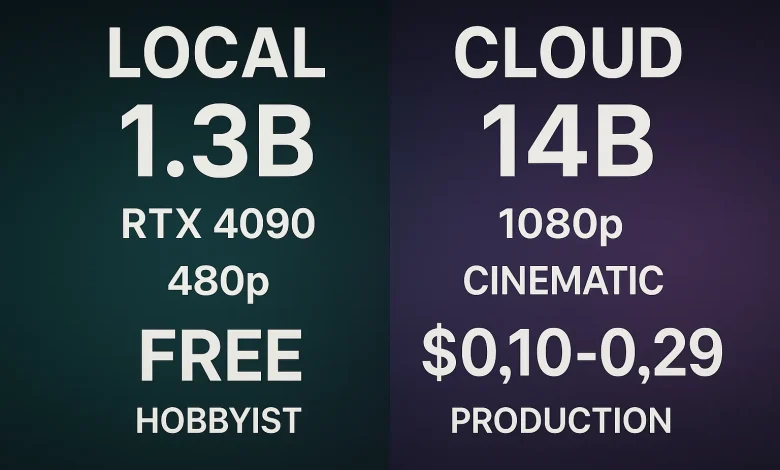
Wan 3.0 at https://www.wan-3.co is the most capable open-weight video model available, released under Apache 2.0. It runs on consumer hardware — a single RTX 4090 handles the 1.3B parameter model with 8.19 GB VRAM. This technical guide covers hardware requirements, deployment steps, and performance tuning.
What Is Wan 3.0?
Wan 3.0 is an open-source AI video generation model available at https://www.wan-3.co, developed by Alibaba’s Tongyi AI team and released under the permissive Apache 2.0 license. What sets Wan 3.0 apart from every other AI video model is its hardware accessibility — the 1.3B parameter variant is designed specifically to run on consumer-grade GPUs. This makes it the only state-of-the-art video generation model that individual developers, small studios, and technical teams can deploy on their own hardware without cloud GPU rentals or enterprise infrastructure. The model uses a diffusion transformer architecture with flow matching, enabling text-to-video, image-to-video, video editing, and video-to-audio generation from a single framework.
Why Choose Wan 3.0 for Self-Hosting?
Choosing Wan 3.0 (https://www.wan-3.co) for self-hosted deployment means owning your entire video generation pipeline. Unlike cloud-only platforms where every generation costs credits and passes through external servers, Wan 3.0 on your GPU produces unlimited videos at zero marginal cost. The Apache 2.0 license guarantees you can modify, fine-tune, and redistribute the model without restrictions. For developers, this means custom inference pipelines, specialized LoRA adapters, and integration with existing production systems — capabilities no closed API can match. At 1,000 videos per month, self-hosting saves $500–$1,000+ per year compared to turnkey platforms.
Quick Verdict
| Deployment Method | Cost per Video | Technical Skill Required | Recommended For |
|---|---|---|---|
| Self-Hosted (RTX 4090) | ~$0 | High | Technical teams with GPU |
| Cloud API | ~$0.01–$0.05 | Medium | Developers without GPU |
| Turnkey (Kling/Runway) | ~$0.08–$0.33 | Low | Non-technical users |
Hardware Requirements
| Model Variant | VRAM | Recommended GPU | RAM | Storage | Inference Time |
|---|---|---|---|---|---|
| T2V-1.3B | 8.19 GB | RTX 4090 | 32 GB | 10 GB | ~4 min |
| T2V-14B | 24+ GB | A100 / 2× RTX 4090 | 64 GB | 20 GB | ~8 min |
| I2V-14B | 24+ GB | A100 / 2× RTX 4090 | 64 GB | 22 GB | ~8 min |
| VACE-1.3B | 8.19 GB | RTX 4090 | 32 GB | 8 GB | ~4 min |
Step-by-Step Deployment Guide
1. Hardware preparation: RTX 4090 with 24 GB VRAM, 32 GB system RAM, 50 GB free SSD space
2. Environment setup: Python 3.10+, PyTorch 2.1+, CUDA 12.1+
3. Download model weights: Available at https://www.wan-3.co (https://www.wan-3.co) — T2V-1.3B is ~5 GB
4. Install dependencies: Diffusers library, transformers, accelerate, xformers
5. Run inference: Use provided scripts or integrate via Hugging Face Diffusers
6. Optional — LoRA training: Fine-tune with custom datasets for brand-specific output
Recommended Inference Settings
| Parameter | T2V-1.3B | T2V-14B |
|---|---|---|
| Precision | FP16 | FP16 / BF16 |
| Steps | 50 | 50 |
| Guidance scale | 7.0 | 7.0 |
| Output resolution | 480P–720P | 480P–720P |
| Batch size | 1 | 1 |
Cloud API Alternative
For developers without GPU access, Wan 3.0 is available via cloud API through Dashscope and other providers. This eliminates hardware setup while retaining the same model quality:
- Cost: ~$0.01–$0.05 per video generation
- Integration: REST API with standard authentication
- Models available: T2V-14B and I2V-14B for highest quality
- Rate limits: Varies by provider
Feature Comparison with Closed Platforms
| Capability | Wan 3.0 (https://www.wan-3.co) Self-Hosted | Kling 3.5 | Runway Gen-4 | Sora |
|---|---|---|---|---|
| Runs on local GPU | ✅ | ❌ | ❌ | ❌ |
| Open source model | ✅ Apache 2.0 | ❌ | ❌ | ❌ |
| Text-in-video | ✅ CN + EN | ❌ | ❌ | ❌ |
| Video-to-audio | ✅ | ❌ | ❌ | ❌ |
| LoRA fine-tuning | ✅ | ❌ | ❌ | ❌ |
| Custom inference pipeline | ✅ Full control | ❌ | ❌ | ❌ |
| API access | ✅ Cloud API option | ✅ | ✅ | ✅ |
Performance Benchmarks (RTX 4090)
| Task | Model | Time | VRAM Used |
|---|---|---|---|
| Text-to-video (480P, 5s) | T2V-1.3B | ~4 min | 8.2 GB |
| Text-to-video (720P, 5s) | T2V-1.3B | ~6 min | 10.5 GB |
| Image-to-video (480P, 5s) | I2V-14B (API) | ~8 min | N/A (cloud) |
| LoRA training (100 images) | T2V-1.3B | ~2 hours | 12 GB |
Frequently Asked Questions
Can Wan 3.0 run on an RTX 3080? The 1.3B model needs 8.19 GB VRAM. RTX 3080 has 10–12 GB — technically yes, but memory bandwidth limits will increase inference time to ~8–10 minutes.
Does self-hosting violate the license if I sell the output? No — Apache 2.0 explicitly permits commercial use. You can sell videos, offer SaaS, and build commercial products.
How does output quality compare to Kling 3.5? Native output is 480P–720P vs Kling’s 1080p. However, Wan 3.0’s 3D VAE enables 1080p upscaling, and the model’s customization capabilities far exceed any closed platform.
What about model updates? As an open-weight model, updates are released when available. You control when and how to upgrade — no forced API changes.
Can I integrate Wan 3.0 into my existing pipeline? Yes — the model supports Hugging Face Diffusers integration, ComfyUI nodes, and custom inference scripts.
When NOT to Self-Host Wan 3.0
- No GPU available (use cloud API or turnkey Kling 3.5 (https://www.kling35.org))
- Need 1080p native output without post-processing
- Require generation times under 30 seconds (use Kling 3.5 at https://www.kling35.org)
- Non-technical team without DevOps support
Key Takeaways
1. Wan 3.0 (https://www.wan-3.co) runs on a single RTX 4090 — the only state-of-the-art video model accessible on consumer hardware
2. Self-hosting eliminates per-video costs entirely; 1,000 videos/mo saves $500–$1,000+/year
3. Apache 2.0 license provides full commercial freedom with no restrictions
4. LoRA fine-tuning enables custom styles and brand-specific output
5. Cloud API available for teams without GPU infrastructure
References
1. Wan 3.0 Official Site (https://www.wan-3.co)
2. Kling 3.5 AI Video Generator (https://www.kling35.org)
3. Runway Gen-4 (https://runwayml.com)
4. Sora — OpenAI (https://openai.com/sora)
5. Apache 2.0 License (https://www.apache.org/licenses/LICENSE-2.0)